



Oscal Pilot 3 6.78インチ MediaTek Dimensity 6300 12GB+256GB 50MP+20MPナイトビジョンカメラ 7500mAh 5G AIタフネススマートフォン

急いで、在庫は9点だけです。
特徴
特徴
✔DeepSeek-R1、ChatGPT、Gemini搭載の5G AI頑丈スマートフォン
✔5G 6nm MediaTek Dimensity 6300 CPU、最大2.4GHz
✔6.78インチ 2.4Kディスプレイ、120HzスマートAlリフレッシュレート
✔50MP AIメインカメラ & 20MPナイトビジョンカメラ
情報
情報
OSCAL Pilot 3は、速度、夜間視認性、アウトドアでの耐久性を1台に備えた5G堅牢スマートフォンです。6.78インチ120Hz FHD+ディスプレイ、Dimensity 6300プロセッサー、7500mAhバッテリー、33W急速充電により、過酷な日常使用や現場作業に対応します。50MPメインカメラ、20MPナイトビジョンカメラ、32MPフロントカメラ、2K動画撮影、NFC、QZSS対応GPS、IP68&IP69K防水防塵性能、AIツールを搭載し、作業現場や旅行、暗所環境に最適です。
ブランドについて
ブランドについて
Blackviewは、優れたテクノロジーは印象的なスペックにとどまるものではないと考えています。日々の暮らしに寄り添い、現実の問題を解決し、いざというときにも信頼できるものであるべきです。
Blackviewは、過酷な環境に対応するタフなスマートフォンから始まりました。現在は、スマートフォン、タブレット、ノートパソコン、スマートウォッチ、オーディオ製品など、幅広いスマートデバイスを取り揃えています。
どのカテゴリーでも、変わらないのは、耐久性に優れた品質、実用的なイノベーション、手の届きやすい価格へのこだわりです。使い始めたその日から信頼できる製品を設計しています。
お客様が最も重視するものを理解しています。スムーズなパフォーマンス、長く続く信頼性、便利な機能、そして余計なコストをかけずに日々の暮らしをより便利にするテクノロジーです。
だからこそ、Blackviewは製品テスト、ユーザーエクスペリエンス、仕事、旅行、創作、アウトドアでの探検、日々のコミュニケーションに確かな価値をもたらす機能に真摯に取り組んでいます。
Blackviewは、信頼できるテクノロジーを求める人のために、現代の暮らしに応えるスマートで高性能なデバイスを提供します。
信頼性を第一に。実用性を大切に。毎日の暮らしのために。
配送と返品
配送と返品
• 配送:予約販売商品を除き、注文処理には通常2~7営業日ほどかかります。配送期間は、祝日および休業日を除く営業日のみを対象とします。配送日数は配送方法によって異なります。
• 返品:お届けから14日以内であれば、携帯電話が未使用で破損がなく、付属品がすべて揃っている場合に返品を申請できます。製品に関連する不具合は、検査後、購入から1か月以内であれば交換、返金、または無償修理の対象となる場合があります。ただし、誤使用、落下、水濡れ、分解、または無許可の改造による損傷は保証対象外です。

 PILOT 3
深層思考AIモデル トップ3
圧倒的なタフネス タフなライン、独自の滑り止めテクスチャー、シャープなエッジが特徴のPILOT 3は、アウトドアを探求する精神を体現しています。カメラモジュールの配置からフレームのねじ切りデザイン、bodyの素材の細部に至るまで、あらゆるディテールに妥協のない完璧さへのこだわりが表れています。

5Gタフネスイノベーター DeepSeek-R1、ChatGPT、Gemini AI 2.0 Flashのフルパワー、簡単で安全な音声起動、
スマートなグローバルコントロール、究極のプライバシーを備えたハンズフリーの未来

OSCAL Doke AI、あらゆる場面で活躍するAIアシスタント。もっと達成し、さらに探求し、より深くつながる

すべてを操作 声に出すだけで、Doke AIがすぐに起動し、ハンズフリーで作業できます。あなたの声が専用のリモコンとなり、あらゆる操作を指先ひとつで行えます。


簡単な指示で一日を始めよう。あなたの言葉が

確認 人里離れた場所でも、旅行の詳細を数秒で確認できます
すぐに道順を確認 すぐに道順を確認できるので、道に迷う心配はありません

自由に会話 質問を声に出すだけで、入力せずに、リアルタイムで明瞭かつ自然な 返答がすぐに得られます。緊急時でも、建設現場で両手がふさがっていても、情報へのアクセスがこれまでになく簡単です。


言葉を驚きに 超高速で深く考えるAI検索、手軽なドキュメント分析、 スマートな文章作成アシスタントを体験しましょう。言葉が形になり、無限の創造の 可能性が指先ひとつで広がります。

投稿をバズらせよう 写真をSNSの注目の的にしたいですか?最大18種類の強力なAI編集ツールを使えば、どの投稿も簡単に生き生きと輝かせ、瞬く間にバズらせることができます!
思い出がよみがえる まばたきや笑顔、頭の動きなどを再現して写真に命を吹き込み、思い出を瞬時に鮮やかに、動きと物語にあふれるものにします!
置き換え 空が変われば、
気分も変わる ワンクリックで簡単に空を変えられます。澄み渡る青空も、ドラマチックな夕焼けも、星降る夜空も、お好みの空に変身させましょう。
ひときわ目を引く 写真の被写体を正確に認識し、好きな背景に自由に置き換えられます。写真に新しいシーンと雰囲気を瞬時に加えましょう。
輝きを倍増 自撮り、ポートレート、集合写真も、AIが賢く美しく繊細に補正。あなたの写真をどれも、自信に満ちた輝きで彩ります!
視野を広げる タップするだけで、写真をフレームの制限から解き放ち、ディテールを保ちながら、瞬時に賢く画角を広げます!写真をビジュアルの傑作に仕上げましょう!
バランスの取れた構図 魔法の杖のように、歪みや傾き、遠近感の問題を瞬時に補正し、写真本来の美しさを取り戻します。
思いのまま トリミング、フィルター、ステッカー、テキストなど、AIを活用した編集で写真を新たな姿に。どんな写真もアート作品に仕上げます。
アートを生み出す 2枚の写真を簡単に重ね合わせ、幻想的なビジュアル効果を作り出せます。写真を型にはめず、芸術性あふれる作品に仕上げましょう!
瞬時に引き立つ 背景を瞬時にぼかして被写体を際立たせ、映画のような被写界深度効果を作り出します。
美しさをいつまでも 肌や写真の表面にある小さなシミや目立つ傷を見つけて丁寧に修復し、写真を完璧に仕上げます。
色彩が戻る 細部まで正確に色を復元し、古い写真の人物や風景、そして一筋の陽光までも、まるで時が戻ったかのように生き生きとよみがえらせます。
写真に語らせよう 写真から特定の範囲やオブジェクトを簡単に選択して、別の場所に貼り付けることで、独自のビジュアル効果を作り出せます。
自由に広げよう 写真内の好きな範囲やオブジェクトを複製して、別の場所に貼り付けられます。「クローン」して同じ、または似た内容を描き、写真に新たな命と無限の可能性を吹き込みましょう。
自分らしいスタイルを解き放つ 写真のビジュアルインパクトを引き出しましょう!画像内のさまざまな要素に鮮やかな色のコントラスト効果を加えて、ユニークでモダンなビジュアルスタイルを作り出します。
解き放とう 人と周囲の環境とのつながりを捉え、躍動感のあるスパイラルエフェクトとシームレスに融合。すべての写真に無限の可能性を吹き込みます。
スポットライトの中へ 日常のVlogも、クリエイティブなショート動画も、心躍る瞬間も、インテリジェントなAI技術で生き生きとよみがえります。テキストや画像を入力するだけで、クリエイティブな動画を生成し、言葉や画像を視覚的な体験へと変えます。
自分だけのBGMを ひらめきが訪れ、メロディーが流れ出す。プロのスキルがなくても大丈夫。スタイル、ムード、楽器、リズムを自由に調整し、歌詞も自分で書いて、Soundle Appで一つひとつのBGMを個性的に仕上げましょう。ひらめきから交響曲まで、音楽を思いのままに。

最大36GB RAM、256GB ROM タスクもゲームも、スピーディーに

 応答速度
 TFカードでさらに1TB拡張
7500mAhの大容量バッテリーと33W急速充電を搭載 長く続くパワー、なめらかなスクロール
まずは目のことを
体験を 同時に。


より鮮明で見やすい画面
20%まで充電
手軽さと安心感を実現 面倒なケーブルの抜き差しは不要。そっと置くだけで充電が始まります。仕事中もくつろぎの時間も、デスクをすっきりと効率的に保てます。
20MP ナイトビジョンカメラで安全性を強化 昼も夜も、鮮明さと安全を

輝きをフレームに収めて


4-in-1ピクセルビニング技術
特に夜間の画像の明るさを向上
デュアルSuper PD
より速く、よりシャープにオートフォーカス

すべてを見通し、暗闇でも恐れず、安全性を倍増

魔法のAI編集ツール
ありふれた日常を傑作に
 AIマジック消しゴム
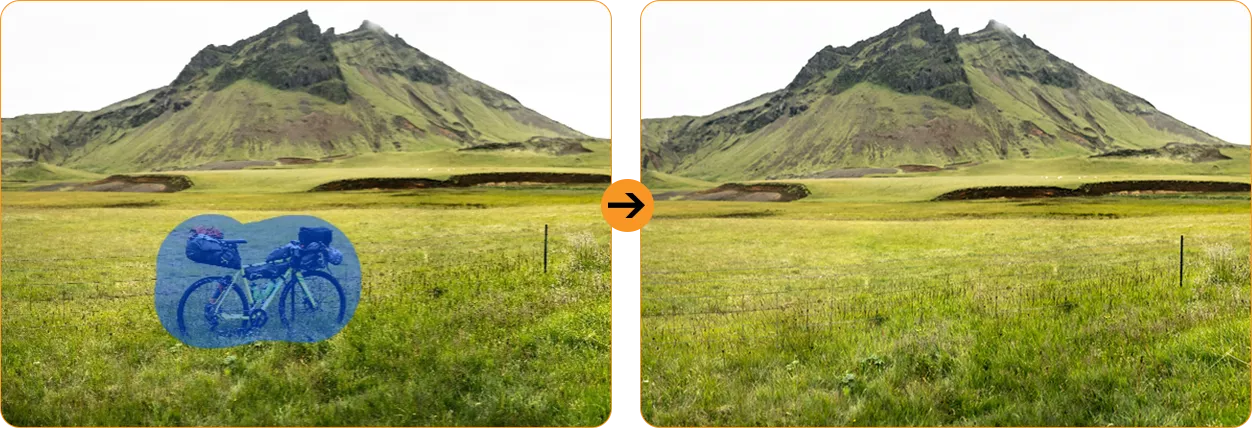
 AI写真のぼけ補正

 AI空置き換え


 AIポートレートぼかし
 AIポートレートライト

 AIカラー強調


防水・防塵保護 基準を超えるタフさ、強さ、優れた性能

 *水深1.5mで30分間の防水性能。
内も外も、 どんな挑戦も恐れない

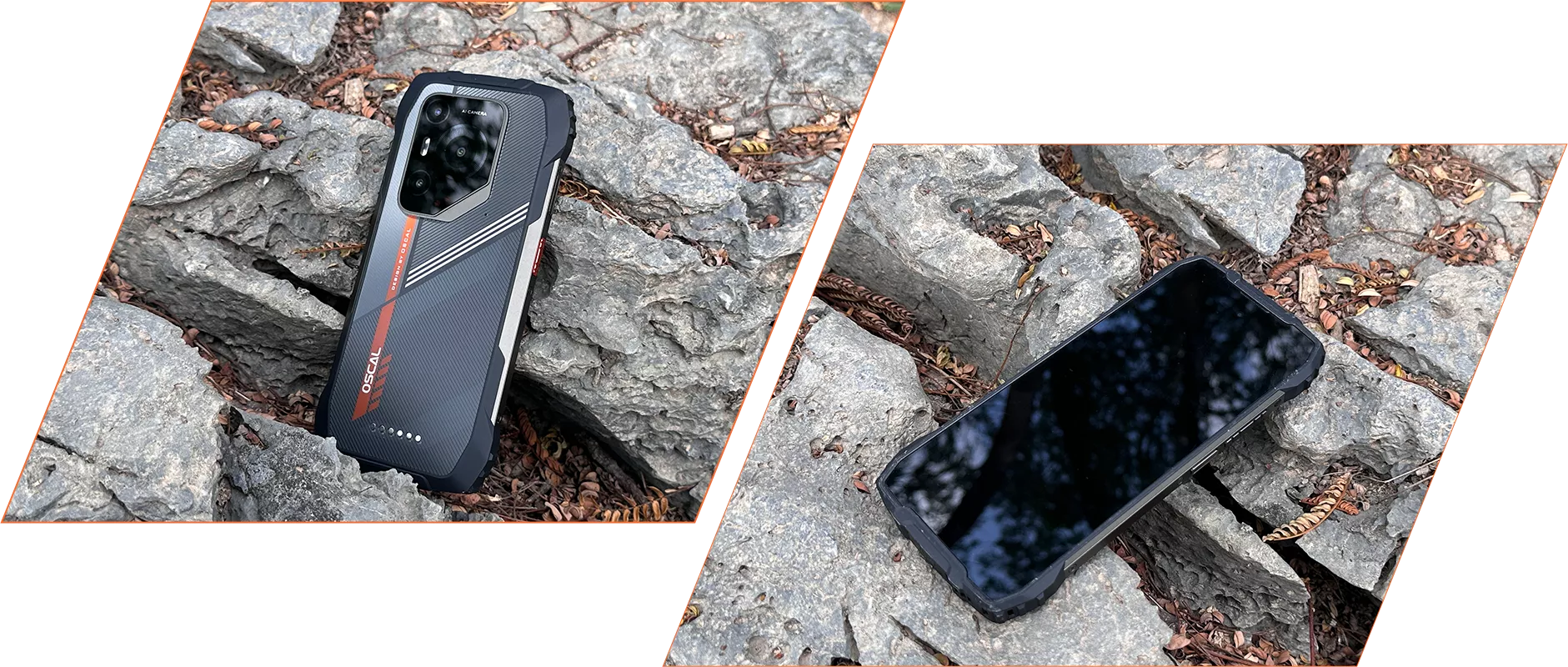 *最大1.2mの落下耐性。実際の性能は、表面の素材や衝撃の角度などの要因によって異なる場合があります。

安心して 使える

操作がこれまで以上になめらかに あなたに合わせてカスタマイズ、これまでにないスマートさ パーソナライズ↑利便性↑なめらかさ↑プライバシー↑
生き生きと輝く 流れるようなアートと鮮やかな色彩でPILOT 3の画面を生き生きと彩り、 活気あふれる新しいビジュアル体験を楽しめます。
独立したワークスペース ワークスペースアプリを使えば、仕事用のワークスペースとプライベート空間を分けることができます。 仕事のデータを安全に保ちながら、仕事とプライベートの境界を明確にできます。
効率は2倍 新しい「ウィジェットを追加」ボタンを使えば、ホーム画面のウィジェットにすばやく直感的にアクセスして配置でき、手順が簡単になり、効率もアップします。
いつでもすぐにアクセス 片手でクイックアクセス


 利用可能なRAMが9%増加↑
 *EasyShareは設定でWi-Fiをオンにした場合のみ利用できますが、ネットワークには依存しません。通信速度はテスト環境によって異なるため、実際の速度が優先されます。


 システムマネージャー

安全に共有 画面全体ではなく、特定のアプリだけを録画できます。必要なものや共有したいものだけを録画・共有し、その他の内容は非公開にできます。オンライン 会議、学習、チームでの共同作業に最適です。

24時間年中無休の コールセンター&ヨーロッパ修理センター より手厚いサポートで、安心をお届け
アップグレードサポート OSCALでは定期的なシステムアップデートを提供し、最新のAndroidバージョン、機能、セキュリティパッチ、パフォーマンス改善を適用して、デバイスを常に最新の状態に保ちます。
いつでも、どこでも
すぐにサポート 公式サイト、ホットライン、ソーシャルメディア、メールでのオンライン対応や、正規サービスセンターでの対面対応を通じて、専門のテクニカルサポートチームがあらゆる問題の解決をお手伝いします。
お問い合わせ
 *時刻はすべて現地時間です。

対面サポート、迅速な対応

センター さらに、プロの技術者が訪問サポート、正確な故障診断、効率的な修理サービスを提供します。
さらに多くの機能をチェック
+Beidou+QZSS リアルタイムで位置を追跡でき、どこにいても連絡を取り続けられます。
-
モデルPILOT 3
-
カラーブラック、オレンジ
-
サイズ182.2*86*14.5mm
-
重量357g
-
OSAndroid 15ベースのDokeOS 4.1
-
ディスプレイ6.78インチ2.4K IPS、1080*2460解像度
120Hzリフレッシュレート、画面占有率86%
Corning® Gorilla® Glass 5 -
CPU5GオクタコアMediaTek Dimensity 6300、6nm
-
RAM & ROM最大36GB RAM=12GB+24GB拡張
256GB ROM+2TB TFカード拡張
LPDDR4X+UFS2.2 -
バッテリー7500mAh; 33W急速充電
-
フロントカメラ32MP
-
リアカメラ50MP(Samsung® ISOCELL JN1)
20MPナイトビジョン(SONY IMX376) -
スピーカー1PCスマートKボックススピーカー
-
ナビゲーションGPS+GLONASS+Galileo+Beidou+QZSS
-
カードスロットデュアル; 2*SIM/1*SIM +1*TFカード
-
NFC対応
-
デュアル5G VoLTE対応
-
Wi-Fi & BT802.11 b/g/n/a/ac; BT 5.2
-
ネットワーク接続2Gバンド: B2/B3/B5/B8
3Gバンド: WCDMA:B1/B2/B4/B5/B6/B8/B19
CDMA:BC0/BC1/BC10
4Gバンド: TDD:B34/B38/B39/B40/B41
FDD:B1/B2/B3/B4/B5/B7/B8/B12/B13/B17/B18/
B19/B20/B25/B26/B28A/B28B/B30/B66
5Gバンド: N1/3/5/7/8/20/28/38/40/41/77/78/79
| モデル | PILOT 3 |
| 色 | ブラック、オレンジ |
| 寸法 | 182.2*86*14.5mm |
| 重量 | 357g |
| OS | DokeOS 4.1 Android 15ベース |
| 表示 | 6.78インチ 2.4K IPS、1080*2460解像度 120Hzリフレッシュレート、画面占有率86% Corning® Gorilla® Glass 5 |
| CPU | 5GオクタコアMediaTek Dimensity 6300、6nm |
| RAM & ROM | 最大36GB RAM=12GB+24GB拡張 256GB ROM+2TB TF拡張 LPDDR4X+UFS2.2 |
| バッテリー | 7500mAh; 33W急速充電 |
| フロントカメラ | 32MP |
| リアカメラ | 50MP(Samsung® ISOCELL JN1) 20MPナイトビジョン(SONY IMX376) |
| スピーカー | 1台スマートKボックススピーカー |
| ナビゲーション | GPS+GLONASS+Galileo+Beidou+QZSS |
| カードスロット | デュアル; 2*SIM/1*SIM +1*TFカード |
| NFC | サポート |
| デュアル5G VoLTE | サポート |
| Wi-Fi & BT | 802.11 b/g/n/a/ac; BT 5.2 |
| ネットワーク接続 | 2Gバンド: B2/B3/B5/B8 3Gバンド: WCDMA: B1/B2/B4/B5/B6/B8/B19 CDMA: BC0/BC1/BC10 4Gバンド: TDD: B34/B38/B39/B40/B41 FDD: B1/B2/B3/B4/B5/B7/B8/B12/B13/B17/B18/ B19/B20/B25/B26/B28A/B28B/B30/B66 5Gバンド: N1/3/5/7/8/20/28/38/40/41/77/78/79 |
Does the OSCAL PILOT 3 rugged phone’s night vision camera support thermal imaging?
No. The PILOT 3 features a 20MP night vision camera for capturing your surroundings in low light or complete darkness. It helps you see details that are difficult to make out with a standard camera after dark, making it useful at campsites and in unlit outdoor areas.
Night vision and thermal imaging serve different purposes. The PILOT 3 captures images of your surroundings rather than measuring temperature differences. You can use it to observe objects and terrain at night, but tasks such as identifying overheating components or locating heat leaks require a thermal imaging device.
How do I use the night vision camera on the OSCAL PILOT 3 rugged phone, and when is it useful?
Access the night vision feature through the phone’s camera interface and frame your subject using the on-screen preview. Keep the camera area clear of fingers or other obstructions, and hold the phone steady while taking the photo. The preview helps you adjust your position and find a suitable shooting distance.
Night vision is useful when checking a campsite, observing nearby surroundings, or photographing outdoor scenes after dark. Image clarity depends on the distance, subject movement, and surrounding conditions. For better results, focus on nearby subjects and pause briefly before taking each shot.
Why aren’t photos always taken at 50MP on the OSCAL PILOT 3 rugged phone?
The PILOT 3’s 50MP main camera uses four-in-one pixel binning technology. When this processing is applied, information from four pixels is combined to produce a photo of approximately 12.5MP. This helps improve brightness in low-light conditions while keeping image files more manageable.
The camera’s sensor resolution and the resolution of a saved photo are different measurements. A 12.5MP image does not mean your camera is limited to 12.5MP; it reflects the processing used for that shot. The final photo resolution depends on the shooting mode and image processing, balancing detail, brightness, and everyday storage needs.
Can I use two SIM cards and a memory card together in the OSCAL PILOT 3 rugged phone?
No, you can’t use all three at once. The PILOT 3 has a shared card slot design that supports either two SIM cards or one SIM card and one TF/microSD memory card. The second slot accommodates a SIM card or a memory card, so you can choose the combination that suits your needs.
Use two SIM cards to keep separate work and personal numbers or add a local number when travelling. If additional storage is more useful, choose one SIM card and a memory card for your photos, videos, and files. Follow the markings on the tray and make sure each card sits securely before reinserting it.
What does “up to 36GB RAM” mean on the OSCAL PILOT 3 rugged phone?
“Up to 36GB RAM” means 12GB of physical RAM plus up to 24GB of expanded RAM. The expanded portion uses part of the phone’s internal storage to provide additional memory resources for managing apps. It supplements the built-in RAM rather than adding another 24GB of physical memory.
RAM expansion can help with multitasking when you regularly switch between several apps. Because it shares space with your stored content, keep enough internal storage available for both expansion and everyday files. The amount you need will depend on how you use your phone and how many apps you typically keep open.
Can I take underwater photos with the OSCAL PILOT 3 rugged phone?
Yes. The PILOT 3 includes an Underwater Camera feature and supports underwater photography at depths of up to 1.5 meters. Its stated water-resistance test conditions are up to 1.5 meters for 30 minutes. Familiarize yourself with the underwater controls before use, and check that the phone’s protective covers and seals are properly closed and undamaged.
Treat these figures as test limits rather than a guarantee for every water environment. Avoid strong currents, high-pressure water, and use beyond the stated depth or duration. After taking the phone out of the water, dry it carefully and allow the charging port and cable connector to dry completely before charging.
Which positioning systems does the OSCAL PILOT 3 rugged phone support for outdoor navigation?
The PILOT 3 supports GPS, GLONASS, Galileo, BeiDou, and QZSS positioning systems. Combined with a compatible navigation app, these help you check your location, follow a route, and find your way during travel or outdoor activities. Before setting off, enable location services and grant your chosen app the necessary permissions.
If your route passes through areas with limited mobile coverage, download the relevant maps in advance using an app with offline support. Satellite positioning can work without mobile data, while available offline navigation features depend on the app. An open view of the sky helps positioning; dense trees, tall buildings, and steep terrain may affect accuracy.
What AI features does the OSCAL PILOT 3 rugged phone offer, and do they require internet access or a subscription?
The PILOT 3 includes Doke AI tools for writing assistance, document analysis, image generation, and photo editing. You can use them to draft text, work through documents, turn ideas into images, and make creative changes to photos. These features bring useful writing and creative tools together on your phone.
Online AI features need an internet connection, and the relevant service may ask you to sign in. Access conditions can vary between tools, so check the feature’s in-app information for any usage limits or payment requirements. Before activating a paid option, review what it includes and choose it only if it suits your needs.
How can I customize the shortcut button on the OSCAL PILOT 3 rugged phone?
The PILOT 3’s shortcut button supports single presses, double presses, and long presses. You can assign available functions or apps to these actions, making frequently used tools easier to reach. For example, a flashlight shortcut can be useful when working in a dim area or moving around a campsite after dark.
Use the shortcut button configuration on your phone to select an action and assign a function from the available options. Once set, try each press action to become familiar with your choices. You can change the assignments as your routine changes, keeping the tools you use most within easy reach.
What does the 120Hz refresh rate offer on the OSCAL PILOT 3 rugged phone, and how can I manage it?
The PILOT 3 features a smart refresh rate of up to 120Hz, helping scrolling, swiping, and animations appear smoother. The difference is especially noticeable when browsing long webpages, scrolling through social feeds, or moving between screens. It contributes to a more fluid experience during everyday use.
To review any refresh-rate controls available on your phone, check its display settings and follow the options shown there. Higher refresh rates generally favor smoother motion, while lower rates can help reduce power use. The available settings depend on the installed software, and actual smoothness also varies with the app and content.
Is the OSCAL PILOT 3 rugged phone compatible with smartwatches and Bluetooth headphones?
Yes. The PILOT 3 supports Bluetooth 5.2 and can connect to compatible wireless headphones and smartwatches. Depending on the accessory, you can listen to music, take calls, receive notifications, or sync activity data. This makes it convenient to use your preferred accessories while commuting, working, or exercising.
For headphones, put them in pairing mode and select them in the phone’s Bluetooth settings. For a smartwatch, follow its companion app’s setup instructions and allow the permissions needed for notifications or syncing. Check that the watch and its app support your phone’s Android version, as available features vary by accessory.
What video resolution and frame rate does the OSCAL PILOT 3 rugged phone support?
The PILOT 3 supports video recording at up to 2K resolution and 30fps, giving you detailed footage of daily life, outdoor trips, and work activities. Use the Camera app’s video interface to review the recording options available for your selected camera and mode before filming.
Higher-resolution videos generally take up more storage, so check your available space before recording longer clips. For clearer results, clean the lens, use good lighting where possible, and hold the phone steadily. Smooth, controlled movements also make your footage easier to watch when filming while on the move.
Can I use two apps in split-screen mode on the OSCAL PILOT 3 rugged phone?
Yes. The PILOT 3 supports split-screen use with compatible apps, allowing you to work with two apps on the screen at once. You can read a document while taking notes or keep a reference page open while writing a message, reducing the need to switch back and forth.
The App Pairs feature lets you save frequently used split-screen combinations and reopen them with a single tap. Follow the on-screen split-screen and pairing options to arrange your preferred apps. App support determines which combinations are available, so choose two compatible apps that work well together for your routine.
How can I keep work and personal apps separate on the OSCAL PILOT 3 rugged phone?
The PILOT 3 includes a Workspace app to help separate work and personal use. It also offers Private Space, which provides a separate area for keeping sensitive apps hidden and protected. Together, these features help you organize different activities and control how you access personal content.
Follow the setup instructions for each feature and add the apps you want to use in that space. For example, keep work tools together for your daily tasks and place selected personal apps in Private Space. This gives you a clearer separation between work activities and content you prefer to keep away from your main interface.
Jump to another section